 PigeonPost
Features Mail
📥 Mail accounts
- Multiple accounts, each a separate inbox, with send-as addresses. The accounts dropdown carries each account's unread count; picking one opens its inbox, including the account you are already in. Mail arriving on an account you are not in lights a second, outlined badge on the closed dropdown, counting only mail newer than your last visit there, so a standing backlog never lights it
- An optional unified mailbox that merges every inbox into one list, each row dotted with its account's colour
- Instant new mail over IMAP IDLE with a desktop notification, plus an unread badge on the taskbar on Windows
- On Windows each of the three things PigeonPost announces has its own chime, so new mail, a calendar reminder and a returning snoozed message are told apart by ear; elsewhere the sound is the one your desktop theme chooses
- Registers as your system's default email app on Windows, macOS and Linux, so a mailto: link on a web page opens a new message here, ready addressed
✍️ Writing and sending
- Rich-text compose with To, Cc and Bcc, per-account signatures, reply, reply-all and forward
- Paste an image and it embeds in the body right where the cursor is, sent as a proper inline image every mail client renders; paste or drop any other file and it attaches
- Start typing in To, Cc or Bcc and matching people from your contacts are suggested; accepting one just inserts text, so you can still edit it freely; the list flows on so the next address can be typed straight away
- Attach files or forward a message as an attachment
- The compose window moves: drag it by its title bar to uncover the message you are answering; every new message still opens centred
- Send later from presets or an exact time; the message waits in the Outbox with Cancel send (a paperclip shows when it carries files) and leaves while the app runs or at the next launch after that time
📄 Templates and drafts
- Reusable message templates, a local crash autosave and a discard confirmation, so a part-written message is never lost silently
- A template carries its attachments as well as its subject and body, so inserting one brings all three into the message at once. The files are stored rather than pointed at, so a template still attaches what it promised after the original has been moved, renamed or deleted; the editor refuses a template heavier than a single message may carry while you are still looking at it
- Save a half-written message as a draft and pick it up later: a draft reopens in the compose window with its recipients, subject, text and attached files as you left them (only Bcc needs typing again) and finishing it replaces the stored copy, so the Drafts folder never fills with stale versions
🗂️ Folders and tags
- Colour tags that sync across devices as IMAP keywords, plus read, star and junk marks
- Nested folders you create and reorganise by drag: the plus beside the Folders heading makes one at the top level and New subfolder on a folder's right-click menu makes one inside it; the arrangement you settle on is remembered per account and survives updates and reinstalls
- Drag mail into a folder and it goes at once: the message leaves the list on the drop rather than after the server has caught up, the folder that took it flashes so you can see where it went; holding a drag near the edge of the folder pane scrolls it so anything below the fold is still reachable
- Drag one message or a whole selection: Ctrl-click picks scattered rows and Shift-click picks a run, then dragging any row of that selection takes all of it
- Ctrl+A selects the whole folder, including the messages you have not scrolled to yet, so a delete, move or mark acts on everything in it; marking a selection read updates every unread badge at once
👀 Reading
- Message HTML renders faithfully in a sandboxed frame that keeps the sender's own styling while running no scripts, with remote images and CSS backgrounds held back until you load them
- In the dark theme the reader darkens each part of a message by the background its sender actually chose, so one that mixes a dark brand panel with a white footer reads correctly throughout and photos and logos keep their true colour
- Only the message body scrolls: the sender, the subject and the toolbar stay pinned above it and the attachments stay pinned at its foot, so Open and Save are one click away on a long reply chain instead of buried under every quoted round
- Dialogs keep their title and leading fields in view the same way, from the compose window's addresses to an event's title and a rule's name, while the rest of the form scrolls
- Turn on the conversation view and the header above a grouped exchange opens it whole: every message of the thread gathered from across the account's folders, so the reply you sent sits with the message it answers instead of staying out of sight in Sent. Each one names the folder it lives in and opens in place to read
- Snooze hides a message until a chosen time then returns it untouched, with a banner in the window you can click to open it and a desktop notification
- Print a message through the system print dialog; remote images print only once you have loaded them
- Help > Guide names every picture the window draws, from the menus and controls along the top bar to each mark in the folder list; it states the rules the windows cannot state for themselves: what is held on your machine, what a permanent delete means and what a snooze or a scheduled send needs from the app; each section's heading holds at the top while that section is read
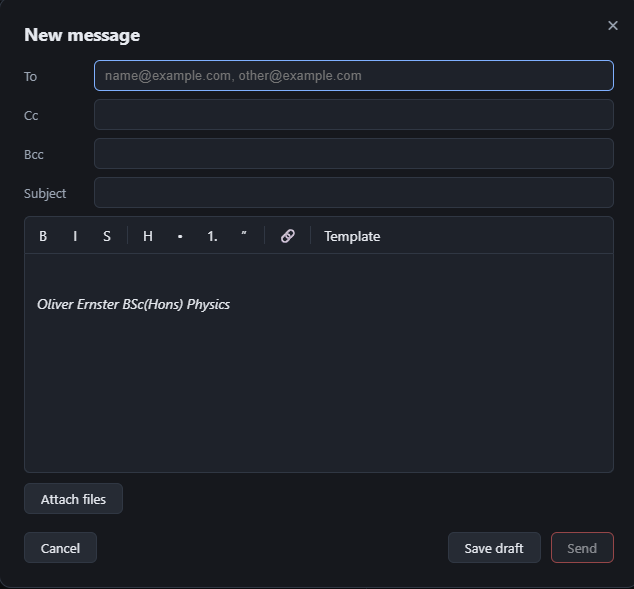
Writing a message: rich text, reusable templates and file attachments.